


In many Luxembourg-based organizations, printing remains an important yet largely underestimated resource (spoiler: you print much more than you think). That’s where PaperCut comes in — a print management solution designed to regain control: better manage costs and secure documents.
With PaperCut MF, you can simplify the user experience on your multifunction printers while providing your IT department with a powerful management solution.
To fully understand what PaperCut can do, the best way is to see it in action — something we can demonstrate for you in our showroom in Leudelange. In the meantime, here are the ten main advantages of PaperCut you should know about:

1. Good for your budget… and for the environmen
PaperCut makes it possible to see exactly who prints what, where, and how.
With this visibility, waste (unnecessary pages, color prints, etc.) can be reduced by setting print rules (black-and-white by default, duplex printing, quotas, and so on).
By showing real-time data on potential savings (paper, CO₂, costs), PaperCut MF naturally helps you adopt more responsible habits.
2. Securing prints and documents
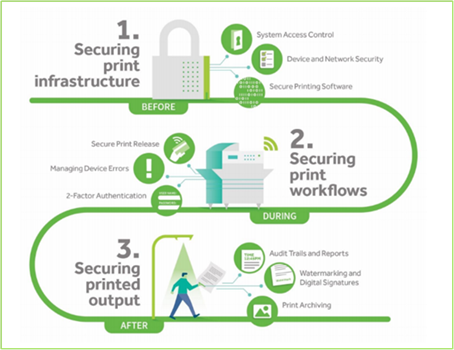
Printing systems are often a weak link in terms of security.
PaperCut MF strengthens this with mandatory authentication systems (badge, PIN code, credentials) and by adding watermarks or user information on pages to reduce the risks of forgery, data leaks, or unauthorized distribution.
3. A flexible, reliable, and user-friendly solution
With the support and guidance of CK experts, the solution adapts easily to your environment (multi-site, multi-brand printer fleets).
The Find-Me Printing function is a great example of this flexibility: users send their job to a virtual print queue, then log in to any Konica Minolta printer supplied by CK to release it.
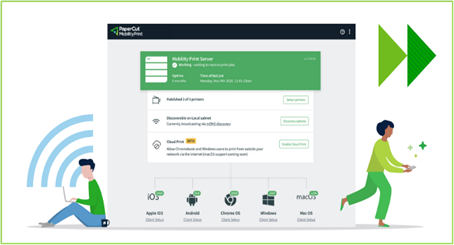
4. PaperCut’s module dedicated to mobile printing and BYOD.
PaperCut MF facilitates printing from all types of devices, including personal ones (BYOD). Mobility Print allows printing from and to almost any device (PC, Mac, Chromebook, smartphone, tablet), regardless of operating system, brand, or model.
5. Print on demand and automatic driver deployment
For traveling users or multi-site organizations, PaperCut MF offers Print Deploy : it automatically assigns the right print driver and print queue.
All this works without requiring a dedicated print server or Active Directory in every case, reducing the need for technical intervention from your IT teams.
6. Simple and scalable scanning features
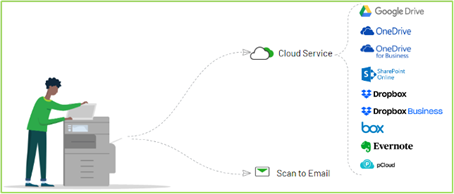
PaperCut MF manages not only printing but also scanning, such as sending scans to email, network folders, or directly to your business applications (with specific configurations as needed). This makes it a valuable aid in standardizing your digitization processes.
7. Reporting based on your actual data
PaperCut MF provides detailed or summary reports per user, department, or even printer, all available in real time.
This is one of the key benefits that lets you measure your gains and fine-tune your internal print policies as needed.
8. Easy to deploy and administer
Installation and setup are designed to minimize complexity — that’s the feedback from our technicians. PaperCut is a solution that evolves with your organization. Adding or integrating new features doesn’t require a complete system overhaul.

9. A smooth user experience
This is the main feedback we get from our clients. For users, the goal is to make printing and scanning as simple as possible.
This user-friendliness reduces errors, avoids unnecessary reprints, and improves compliance with print policies.
10. Support from an industry expert
Finally, PaperCut is backed by a global network of partners and experts (including CK for Luxembourg), ensuring seamless customer support.
The PaperCut ecosystem enables us to guide you from the needs assessment stage all the way to the daily operation of your print resources.